

Where can I find a polymer materials manufacturer with UL certified products? Start with UL Product iQ and IDES Prospector. These directories list certified materials by manufacturer name, product category, and UL file number.
A wrong assumption about UL certification can force retesting, redesign, or supply chain delays. You must check documentation before ordering. Ask the supplier for the latest yellow card. Check the UL file number against the directory listing. The file number appears on the yellow card and must match exactly.
Focus on these two documents. They prove the material's flammability rating and performance profile. A recognizable brand name alone never substitutes for actual UL documentation.
Key Takeaways
Look in UL Product iQ or IDES Prospector for certified polymer materials.
Ask to see the yellow card, and make sure the UL file number matches the one in the directory.
Choose the UL94 rating that matches your part's thinnest wall thickness.
Check the manufacturer's complete UL approval range for each grade.
These steps save time and money by preventing retests and delays.
Start with UL's Online Directories
Search UL Product iQ and IDES Prospector
Start your search with UL Product iQ. This directory is free and you can search by manufacturer name, product category, material family, or UL file number. You can also check the UL Solutions Product Sourcing and Certifications Database to verify. These tools give you direct access to certification records.
IDES Prospector helps you compare certified polymer grades side by side. You can review yellow card data and manufacturer trade names in one view. This comparison saves time when you check multiple materials for your project. Directory listings must show the exact manufacturer name before your search goes further. A partial match or a similar name does not confirm certification.
Use Manufacturer Names and File Numbers in Directory Searches
Follow these steps to search UL Product iQ the right way:
Go to the UL Product iQ directory at productiq.ulprospector.com.
Pick the File Number search option.
Type either the UL file number (like E489165) or the manufacturer's name in the search box.
Search by file number when you can, because it is more reliable. Manufacturer or brand names may be copied in fake listings.
Check the listing details, such as category, company, listing status, and applicable UL standards. Make sure the status is Active.
A UL mark that does not match a file number in Product iQ should be seen as a red flag and is not a valid listing.
This verification step protects your project from false claims. Any polymer materials manufacturer can show up in a directory, but only an active file number confirms real certification. Always check the listing status before you ask the supplier for quotes or samples.
Why UL Component Recognition Matters

Reduce End-Product Testing Time and Cost
When a material is a UL-recognized component, it has a recorded flammability and performance profile. That record can reduce the testing that your end product needs. UL Solutions plastics testing and certification services provide the bigger framework for this review. When your material already carries recognition, you start with verified data instead of building a test program from scratch.
For polymer components that hold UL Recognized Component documentation, the basic plastics testing program uses identification tests. These tests are Infrared Spectroscopy (IR), Thermogravimetric Analysis (TGA), and Differential Scanning Calorimetry (DSC). Each test checks the material's identity and thermal behavior. You save time because the material's core properties are already known. You save money because you do not repeat tests the manufacturer has done.
Avoid Compliance Gaps in Your Supply Chain
Component recognition is not the same as a full product listing. Under UL's Recognized Component Mark, UL checks components or materials rather than end-use products. When a component or material is tested and meets the needed UL standards, it is named a UL Recognized Component. These components or materials are designed to be placed into an end-use product or system. That end-use product may later become eligible for UL listing or classification.
Applies To | Intended Use | |
|---|---|---|
UL Listed | Whole products (e.g., enclosures) | Used on their own |
UL Recognized | Components (e.g., rubber/polymer materials) | Incorporated into a larger whole |
Your finished product may still need more review. Using non-recognized material can cause compliance gaps that stop production. A reliable Polymer Materials Manufacturer offers recognized grades with clear documentation. Check each material's recognition status before you commit to a supplier.
Confirm Certification with Yellow Cards and File Numbers
Read the Yellow Card for UL Details About Your Material
The yellow card for your polymer material is the UL Recognized Component record. You can see the trade name, available colors, thickness ranges, and UL94 ratings on it. Get the latest yellow card from your supplier. Then compare it to the UL directory listing.
Your yellow card must list the exact grade name. The UL94 rating must apply at a thickness equal to or thinner than your part's thinnest wall. UL94 ratings are tied to specific thicknesses, not the whole material. The same polymer can drop a class or fail when the thickness is lower. Thin parts ignite and burn faster. One published example shows a material passes at 1.5 mm but fails at 0.74 mm. Reject any callout with no thickness listed.
Check these fields on every yellow card:
Manufacturer and exact grade name
UL class and the smallest recognized thickness, or thickness range
Recognized colors, or all colors if the record covers all
Formulation or processing limits that apply to the material
Applicable UL recognition record or Yellow Card
Here is a typical yellow card entry:
Trade Name | Available Colors | Thickness Range / Minimum Thickness | UL94 Rating |
|---|---|---|---|
BF-2000 | Black | 2.2 mm | V-0 |
BF-1000 | White, Black, Gray | 1.5 mm | V-0 |
HT-870 | Black, Red | 1.5 mm | V-0 |
HT-800 | Black, Gray | 0.7 mm | V-0 |
HT-6360 | Black | 0.5 mm | V-0 |
Heavy FR additive loads can cut color choices and make exact matching hard.
If no yellow card has been published but someone says it meets the rules, request an independent lab test report for that exact grade and thickness. Also request Certificates of Analysis. These tie the delivered resin lot to the approved grade on the yellow card.
Check the UL File Number in the Directory Listing
The UL file number is a special ID in the Recognized Component Directory. It often looks like a code, such as QMFZ2 for plastics components. The number must appear on the yellow card. It must match the directory entry exactly.
Follow these steps to check:
Open UL's Product iQ database at UL.com.
Search by manufacturer name or UL file number.
Filter or scroll to the right material family.
Check certification details, such as flame rating, minimum thickness, and approved colors.
Make sure the listing status is Active.
A polymer material manufacturer may supply material in many thicknesses and colors. Check each attribute on its own. The UL Yellow Card program records materials based on the exact tested setup. It does not certify a whole resin family. Check the exact grade, thickness, color, additive setup, rating, and file record for every variation you plan to use. This step keeps your project from missing requirements. It also makes sure your chosen polymer material manufacturer meets your application needs.
Interpret UL94 Flammability Ratings Without Confusion
Understand HB, V-0, V-1, and V-2 Ratings
HB is the entry-level horizontal test. A 125 mm bar sits between marks at 25 mm and 100 mm. A flame contacts it for 30 seconds. It passes when it self-extinguishes before the mark. For 3–13 mm, burn rate stays under 40 mm/min; below 3 mm, it hits 75 mm/min. HB proves slow burning; no rating guarantees compliance.
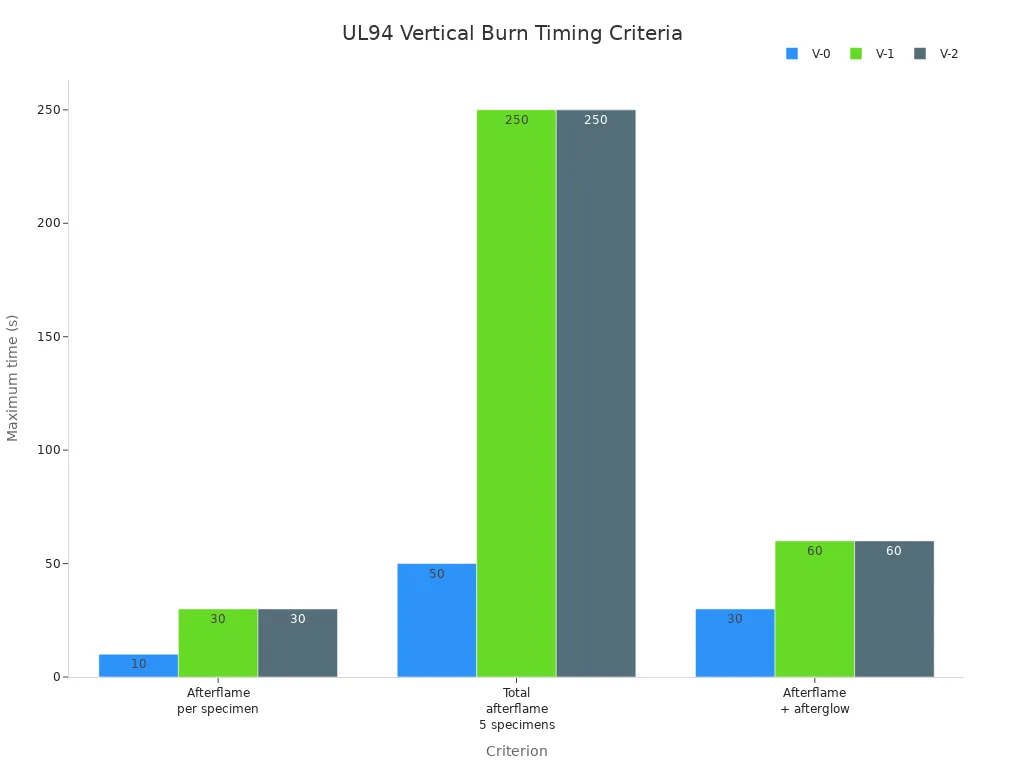
The vertical test is stricter. Testers use two sets of five bars. They apply a 20 mm blue flame twice for 10 seconds. They record afterflame time, afterglow time, and cotton ignition.
Criterion | V-0 | V-1 | V-2 |
|---|---|---|---|
Afterflame per specimen | ≤ 10 s | ≤ 30 s | ≤ 30 s |
Total afterflame (5 specimens) | ≤ 50 s | ≤ 250 s | ≤ 250 s |
Afterflame + afterglow (2nd application) | ≤ 30 s | ≤ 60 s | ≤ 60 s |
Burn to holding clamp | No | No | No |
Flaming drips ignite cotton | No | No | Yes |
V-0 and V-1 differ only in timing; V-0 extinguishes three times faster. V-2 permits flaming drips; V-1 does not. V-0 suits electronic connector housings; V-2 fits consumer electronics enclosures. A failing bar drops the set.
Wall thickness matters as much as the rating. A material may earn V-0 at 1.5 mm and V-2 at 0.8 mm. Pigments can alter flammability. Yellow cards list the tested colors and thickness ranges. Your 1.0 mm wall fails if V-0 applies only at 1.5 mm.
Compare 5VA, 5VB, and Glow Wire Requirements
The 5V family targets thick enclosures with a larger flame up to five times. 5VA must not form a burn-through hole. 5VB may form one. That makes 5VA more stringent.
Glow wire rules cover appliances under IEC 60335-1. Your resin needs a Glow-Wire Flammability Index of at least 850 °C and a Glow-Wire Ignition Temperature of at least 775 °C. If it misses 775 °C, the part must pass a 750 °C Glow-Wire End-Product Test. Ignition must self-extinguish within 2 seconds after withdrawal. Longer persistence triggers a needle flame test.
Build a Polymer Materials Manufacturer Verification Checklist
Confirm the Manufacturer's Full UL Recognition Scope
Start your polymer materials manufacturer check with a search in the UL directory. Look up the exact brand and grade in UL Product iQ or IDES Prospector. The listing must show an Active status. Then ask the supplier for the newest yellow card. Compare that yellow card right against the directory entry. Grade name, colors, thickness range, and UL94 ratings must all match exactly.
Do not think one broad certification covers the whole brand. A UL file covers only certain grades, colors, and thicknesses. Each product line needs its own check. This rule holds for every supplier, including a modified plastics producer like Super Dragon Engineering Plastics. Judge each product line by itself. A flame rating for one compound does not carry over to another compound in the same catalog. Ask for the recognition scope in writing. That scope spells out the approved conditions for each grade.
Review Compound Series and File Number Types
UL file numbers come in two forms. A proprietary file number belongs to one manufacturer and covers grades only that company makes. A component file number may cover a compound series shared by several manufacturers or licensees. Know which type fits your material. The yellow card shows the file number. The UL directory entry shows the same number. They must match exactly.
Ask the manufacturer to explain the file number type. Ask if the recognition covers one grade or a whole series. Then ask for the UL recognition scope document. That document lists the tested colors, minimum thickness, and processing limits. Use the material only inside those conditions. Using a grade outside its recognized thickness range cancels the rating. Your end-product testing may then fail.
Finish the check with a final list:
Search the UL directory for the exact manufacturer and grade.
Check that the UL file number on the yellow card matches the directory.
Confirm the exact grade, colors, and thickness range in both records.
Contact the manufacturer for the technical data sheet and recognition scope.
Match the UL94 rating to your application's minimum wall thickness.
This process guards your supply chain. A few minutes of checking prevents costly retesting and project delays. A recognizable brand name never takes the place of real UL documentation from a reliable polymer materials manufacturer.
Four steps can verify any Polymer Materials Manufacturer:
Search UL Product iQ or IDES Prospector for the exact grade. Confirm the listing status is Active.
Ask for the newest yellow card. Compare it with the directory. Check trade name, colors, and thickness range.
Confirm the UL file number matches the directory entry exactly. A mismatch means invalid certification.
Match the UL94 rating to your part's thinnest wall. A rating at 1.5 mm does not apply at 0.74 mm.
These checks take minutes. They keep your project on schedule. They also prevent costly retesting. A well-known brand name never replaces real UL documentation. Certification records prove compliance. Marketing claims do not.
FAQ
How do I check if a polymer grade holds UL recognition?
Search UL Product iQ using the file number or the manufacturer's name. Make sure the listing status shows Active. Then ask for the yellow card and compare the grade name, colors, and thickness range with the directory entry. Both records must match exactly.
What does a yellow card tell me about a material?
A yellow card shows the trade name, available colors, thickness ranges, and UL94 ratings for a recognized component. Check that the UL94 rating applies at a thickness equal to or thinner than your part's thinnest wall. Reject any callout that does not list a thickness.
Can one UL file cover an entire product catalog?
No. A UL file covers only certain grades, colors, and thicknesses. Each product line needs its own check. Ask the manufacturer for the recognition scope in writing. That document explains the approved conditions for each grade.
What is the difference between a proprietary file number and a component file number?
A proprietary file number belongs to one manufacturer and covers grades only that company makes. A component file number may cover a compound series shared by several manufacturers or licensees. Ask the manufacturer which type fits your material.
Does a UL94 V-0 rating guarantee my end product will pass safety testing?
No. UL94 tests the material, not the finished product. Your end product may still need more evaluation. Match the rating to your application's minimum wall thickness. A rating at 1.5 mm does not apply at 0.74 mm.